If you have ever managed a business, a project, or a team, you know how overwhelming the daily grind can be. From the moment I wake up, I am flooded with messages from Slack, WhatsApp, and email, alongside managing employee requests, finances, and content creation. It is easy to feel like you are drowning in information. The reality is that our brains were not built to act as databases holding endless amounts of "state"; they are meant for decision-making, deep thinking, and human interaction.
At Enpitech, we provide R&D services to startups and implement advanced AI processes to help organizations run faster and more efficiently. To handle the modern flood of information, I have developed a comprehensive system using AI to create a "Second Brain." By turning manual, tedious tasks into automated, and even autonomous workflows, we can offload the heavy lifting to AI and keep our minds free.
Here is an in-depth look into how we build these workflows at Enpitech, and how you can implement them to scale your own operations.
--------------------------------------------------------------------------------
1. Preparing Your Environment: Context is King
Before you can start automating your life, you have to build the right foundation. AI agents are only as good as the context you provide them. It does not matter if you are using Claude, Cursor, ChatGPT, or Gemini; if you do not feed the AI the right background information, it will fail.
To do this, we create a "single source of truth", usually a centralized cloud repository where all the project files live, keeping the context unified instead of scattered across different software. Inside this environment, we structure our AI's knowledge into three critical components:
- Project Rules (cloud.md / rules.md): This is the mandatory baseline file that teaches the AI the core guidelines, domain knowledge, and context of your business or specific project.
- Skills: Think of these as specialized recipes for specific tasks. Instead of overloading the AI's general memory, you give it skills to use only when needed—such as exactly how to find leads on LinkedIn, how to write a sales script, or how to develop a specific type of code.
- Sub-Agents: These are specialized AI agents with their own isolated context windows, acting like individual experts on your team. You can have a Product Agent, a QA Agent, or a Security Agent.
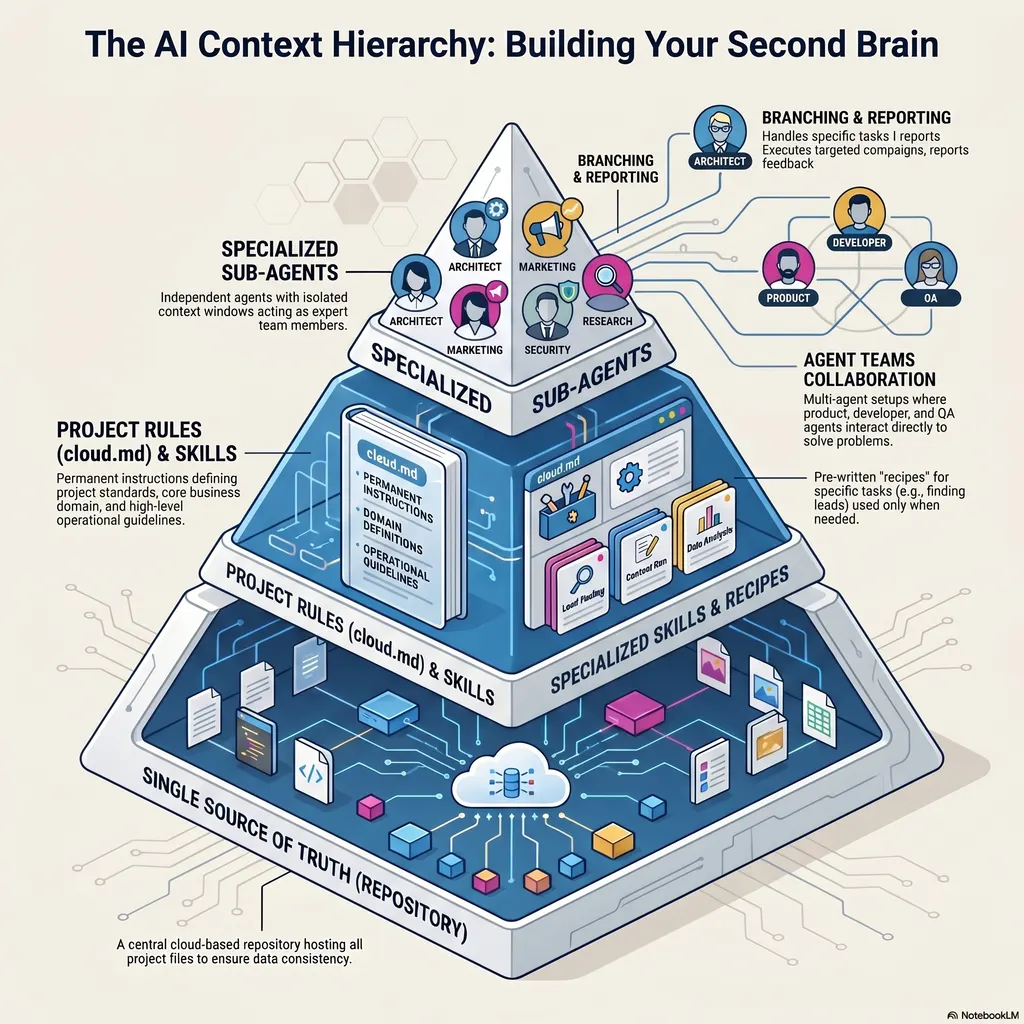
For those ready to take it to the extreme, tools like Claude allow for Agent Teams, where multiple sub-agents (e.g., a Product Agent, a Developer Agent, and a QA Agent) communicate directly with one another to build a feature, reporting back to a main "Team Lead" agent.
--------------------------------------------------------------------------------
2. The "Capture" Workflow: Never Lose a Brilliant Idea
Great ideas rarely come when you are sitting quietly at your desk. They hit you in the shower, while cooking, or while stuck in traffic. If you don't capture them instantly, they disappear. Since focus is our most precious resource, we built a workflow to catch these thoughts without breaking concentration.
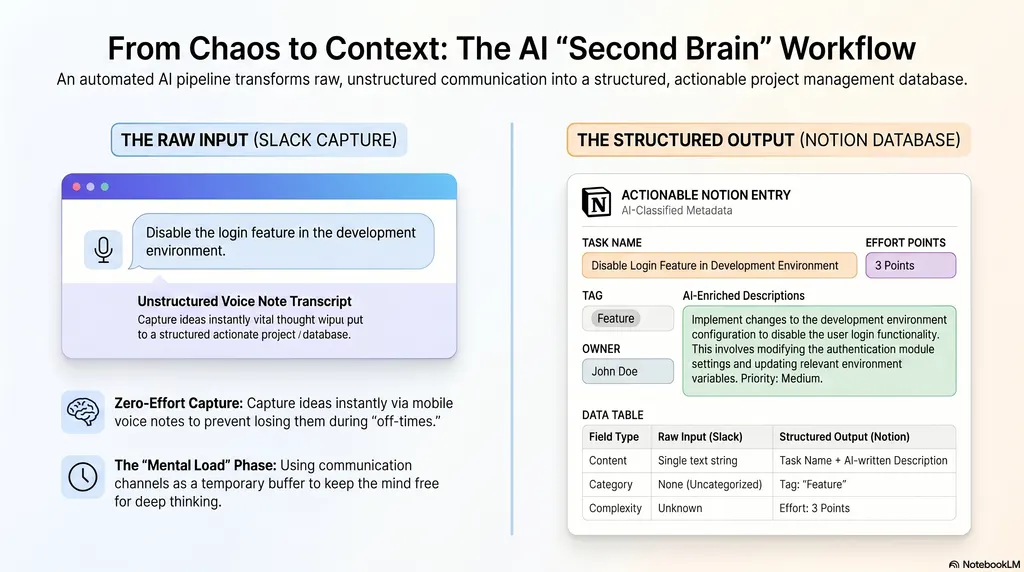
Using an automation tool like Zapier, I built a Capture Workflow where I can simply drop a text or voice note into a dedicated Slack channel (like #second-brain). Here is how the AI handles it behind the scenes:
- Transcription: If the message is a voice note, the automation routes the audio file through a tool like Whisper to transcribe it into text.
- Analysis & Formatting: The text is sent to an AI model (like Gemini or Claude) along with a specific prompt instructing the AI to categorize the raw thought. The AI formats the output into a clean, structured JSON file.
- Enrichment: The AI automatically determines the task type (e.g., Bug, Feature, Task), estimates the effort required (points), provides a confidence level for its estimation, and writes a neat description.
- Logging: Finally, Zapier maps this structured data directly into our Notion database.
I don't have to open my computer, log into Jira, or manually fill out a ticket; I just speak or type, and the AI neatly files my thought into the correct project sprint.
--------------------------------------------------------------------------------
3. Smart Triggers: Turning Labels into Automated Execution
Capturing ideas is a game-changer, but executing them automatically is where the magic really happens. We take our Second Brain a step further by using standard labels as API triggers to wake up our sub-agents.
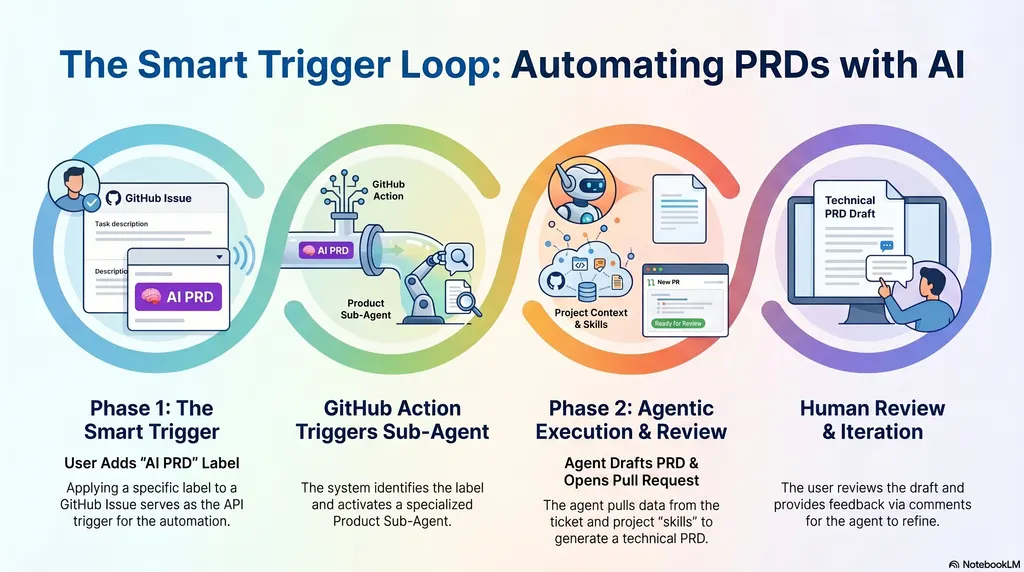
For example, when I am ready to move forward on a feature in my Notion or GitHub board, I tag the ticket with an "AI PRD" label.
- This label triggers a GitHub Action.
- The action wakes up my dedicated "Product Sub-Agent," pulls the raw idea from the ticket, and combines it with our project's rules (
cloud.md) and standard skills. - Within minutes, the AI generates a comprehensive, high-quality Product Requirements Document (PRD)—complete with product reasoning and technical architecture—and opens a Pull Request (PR) for me to review.
Why not just let the AI write the code immediately? We specifically separate the PRD writing from the actual coding implementation for three reasons: not every task needs a massive PRD, keeping the tasks separate saves on costly context tokens, and most importantly, I want to review and tweak the product logic before the AI starts writing code.
--------------------------------------------------------------------------------
4. The Human-AI Collaboration Loop
No AI is 100% perfect on the first try, and I still don't trust it blindly. This is why the AI delivers its work via a Pull Request. It allows for a seamless collaboration loop.
If the AI writes the PRD but misses a crucial technical detail—like how we are handling a database migration—I don't have to rewrite it myself. I simply leave a standard comment on the PR in GitHub, saying: "The risks mentioned in section 4 are inaccurate, please add references to the DB migration".
The AI agent reads my comment, understands the exact context of the document, automatically rewrites the PRD to include my notes, and pushes the updated commit directly back to the PR. Because this is integrated into GitHub, I can review these documents and chat with the AI straight from my phone, no matter where I am.
--------------------------------------------------------------------------------
Stop Acting Like a Database
By building a Second Brain, you can stop acting like a database and go back to being a visionary. My biggest piece of advice? Start small. Pick one single workflow—like capturing ideas from Slack into Notion—and automate it. Once you experience the freedom of not having to manually log every task, it will open your mind to endless possibilities.
If you are looking to scale your startup's R&D, or want to seamlessly integrate custom AI workflows and "Second Brain" systems across your entire organization, we are here to help. Book a free consultation with us at Enpitech today!